
Practical Tech Guide to Used Goods in Austria: How to Find Trusted Gear
A clear, checklist-style guide for tech readers on evaluating Gebrauchtwaren in Österreich, safety, dependability, and smart buying steps with concrete examples

You want to buy used tech in Austria without risking scams or poor quality. This guide shows practical steps, from verifying seller credibility to testing devices, so you can make confident choices. Each paragraph delivers actionable tips you can apply today to a purchase that lasts.
First, assess your needs and window-shop safely. Start with a clear list of devices you want and set expectations for condition, warranty, and return options. Then map trusted channels and how to verify listings before you commit.
Finally, prepare to verify hardware, avoid common traps, and document your purchase for future support. The goal is to combine caution with speed so you don’t miss good deals or end up with faulty gear.
- This guide helps you evaluate, test, and buy used tech in Austria with confidence. It covers where to shop, how to test, and how to protect yourself from common pitfalls.
- You learn to choose platforms with protections, decide when warranties are worth it, and how to document every step for returns or support.
- Avoid misrepresented items, protect your data, and maintain an objective, checklist-driven approach to every listing.
- The plan includes practical steps, concrete checks, and a workflow you can apply to any upcoming purchase.
Basics: where to start with used gear
Assess your needs clearly
Begin with a precise checklist of devices and must-have specs. This helps you compare listings quickly and avoid unnecessary options. Document your ideal price range and acceptable wear to keep decisions objective. Gebrauchtwaren in Österreich offers multiple marketplaces to compare and verify, but buyer diligence remains essential.
For example, you may need a laptop with at least 16GB RAM and a reliable battery. Compare models you see against that baseline to filter results efficiently.
Consider your long-term needs: software compatibility, OS updates, and potential repair costs. This keeps your search focused on items that stay useful over time.
- Create a device wishlist
- Set performance benchmarks
- Define acceptable cosmetic wear
- Plan a search window
Verify credibility of the seller
Check profile history and ratings on marketplaces, noting patterns of reliability. Favor listings with detailed photos and clear provenance. A seller’s responsiveness often signals reliability.
Ask for maintenance records or original accessories to gauge completeness. Avoid deals with vague descriptions or missing warranty language.
Use built-in dispute options on platforms as a last resort if the listing seems incomplete. A cautious seller usually welcomes extra questions.
- Review seller history
- Request documentation
- Evaluate response quality
- Utilize platform protections
How to test devices safely

Perform quick hardware checks
Power on the device and scan for obvious defects like dead pixels or uneven backlighting. Check ports, Wi-Fi, Bluetooth, and webcam functionality. These tests catch red flags early. Österreich24 aktuelle Nachrichten often reference tech trends and marketplace activity that can inform timing and demand.
- Power on and test critical components
- Check ports and wireless features
- Observe boot behavior and responsiveness
Inspect the chassis for stiffness in hinges or loose panels. Run a boot-up test to confirm the device reaches the OS without freezes.
If accessible, run a lightweight benchmark to gauge performance relative to the model’s expectations. This helps you decide if the price matches the capability.
- Screen and display check
- Port and connectivity test
- Hinges and chassis inspection
- Performance basics
Options: platforms, warranties and returns
Choosing the right platform
Different platforms offer varying levels of buyer protection and return windows. Prefer sources with transparent listings and active support channels. Cross-check prices across sites to confirm fairness. Termine veröffentlichen in Österreich requires careful privacy handling when coordinating tech events or sales.
Consider whether the platform offers escrow or payment protections. This reduces risk if a listing turns out to be unsafe or misrepresented.
Balance speed with security: faster deals may come with less reliability, while slower routes can offer stronger guarantees.
- Platform protections
- Return policies
- Escrow and payment safety
- Price comparison
| Aspect | What to check | Recommendation |
|---|---|---|
| Condition | Photos, battery health, display | Prioritize items with detailed photos and battery tests |
| Warranty | Transferability and scope | Prefer listings with transferable coverage |
| Security | Data wipe, accounts | Choose sellers who document resets and firmware status |
When to buy with warranties
A warranty shifts risk from buyer to seller and may cover hardware faults beyond a short cosmetic period. Read the terms carefully and confirm what qualifies as a defect.
Used devices with remaining manufacturer or retailer warranties offer more confidence, but verify transfer rules and coverage limits.
If no warranty exists, plan for a conservative price and a quick post-purchase test to catch issues early.
- Warranty coverage
- Transferability
- Cost vs. risk
- Post-purchase testing
Be wary of first-price offers that seem too good to be true; they often conceal flaws or device blockers.
Pitfalls to avoid

Common misrepresentations
Some listings exaggerate device condition or hide issues like battery degradation. Always look for objective indicators such as photo metadata, serial numbers, and test results. Firmenverzeichnis in Österreich can help locate trusted refurbishers and service centers for used devices.
- ☐ Beware vague descriptions
- ☐ Demand full photos and tests
- ☐ Question odd price gaps
Avoid deals that lack basic photos or omit essential specs. If something feels vague, step back and ask targeted questions.
Be wary of first-price offers that seem too good to be true; they often conceal flaws or device blockers.
- Red flags in listings
- Incomplete photos
- Vague specs
- Too-good-to-be-true prices
Data privacy risks
Reset the device before use if possible and ensure data wipe is documented. Private data on a used device can pose security risks.
Check that shipped devices come with original firmware and avoid devices with locked accounts or unknown ownership.
If you cannot verify data wipe, choose a seller who provides a clean device or opt for a trusted refurbisher.
- Factory reset
- Firmware status
- Account locks
- Refurbisher trust
Security considerations for reused devices
Data sanitization and memory leaks
When buying used gear, prioritize devices that can be wiped clean and reset to factory defaults. Verify original OS license status and check for known firmware vulnerabilities. Request evidence of data erasure or perform a self-test with reputable software if allowed by the seller. Österreich Traueranzeigen is not directly related to technology, but the phrase can appear in estate-related device disposals where careful handling of data and legacy equipment matters in Austria.
Ensure you understand the device’s reset process and back up any critical data before wiping. If the seller cannot demonstrate a proper reset, walk away and seek warranties from reputable sellers. Avoid devices with leftover enterprise management profiles or inaccessible recovery modes.
- Request factory reset proof
- Check for activation locks
- Test secure erasure tools
- Inspect recovery options
- Prefer certified refurbished
Secure transfer and data privacy
Arrange in-person handoffs in public spaces and, when possible, use secure payment methods that leave a trace. Clear any linked accounts or cloud services before the exchange. Disable or remove any residual profiles from the device after purchase.
Be prepared to revoke access tokens or accounts you inherit, and change passwords immediately after setup. If the device stores credentials locally, ensure they are not recoverable. Consider enabling device encryption on first boot.
- In-person handoff
- Remove accounts
- Change passwords
- Enable encryption
- Verify no cloud ties
Legal and tax implications for resellers

Compliance basics for small sellers
Resellers should keep clear records of each sale, including item condition and receipts. Understand local tax obligations, such as sales tax collection and reporting requirements. Maintain transparent policies on returns and guarantees to reduce disputes.
Regularly review changes in consumer protection laws that affect second-hand sales. Use simple invoices and item descriptions to avoid misrepresentation. Track inventory and issue refunds promptly when warranted.
- Maintain itemized receipts
- Track inventory changes
- Document conditions accurately
- Clarify return policies
- Stay updated on local rules
Warranty and consumer rights
Offer limited warranties only when you can reliably honor them. If you cannot, disclose this limitation upfront to avoid disputes. Ensure customers understand what is covered and for how long, preferably in writing.
Be prepared to handle warranty claims fairly, including replacement or repair options. Clear communication reduces returns and raises trust in a small tech business.
Know when consumer rights laws override seller policies and how to handle refunds or exchanges accordingly.
- Close-to-home policy
- Disclosures in writing
- Fair processing of claims
- Clear reachable contact
- Know local protections
Sustainability and device recycling in tech
Repair, reuse, and end-of-life plans
Prioritize repair over replacement where feasible to extend useful life. Offer take-back options or partnerships with local recyclers to close the loop. Document end-of-life handling for each item to improve transparency.
Explain environmental benefits of repair and reuse to customers, which can justify reasonable pricing and build loyalty. Demonstrate proper disassembly and safe disposal of batteries and hazardous components.
Provide guidance on safe storage of unsold inventory to prevent damage and ensure recyclability when the item is finally recycled.
- Repair over replace
- Take-back programs
- Battery disposal guidance
- Transparent end-of-life records
- Customer education
Invest in certified e-waste partners and document chain-of-custody for recycled components. Encourage customers to select certified refurbishment where available. Provide clear labeling about material reuse to empower informed choices.
Evaluate the environmental impact of packaging and shipping, opting for recycled or reduced materials when possible. Consider carbon-aware delivery options and bulk drop-offs to minimize transport emissions.
Keep an internal policy on data protection during recycling, ensuring sensitive information is securely handled before items leave your facility.
Future-proofing purchases and upgrades
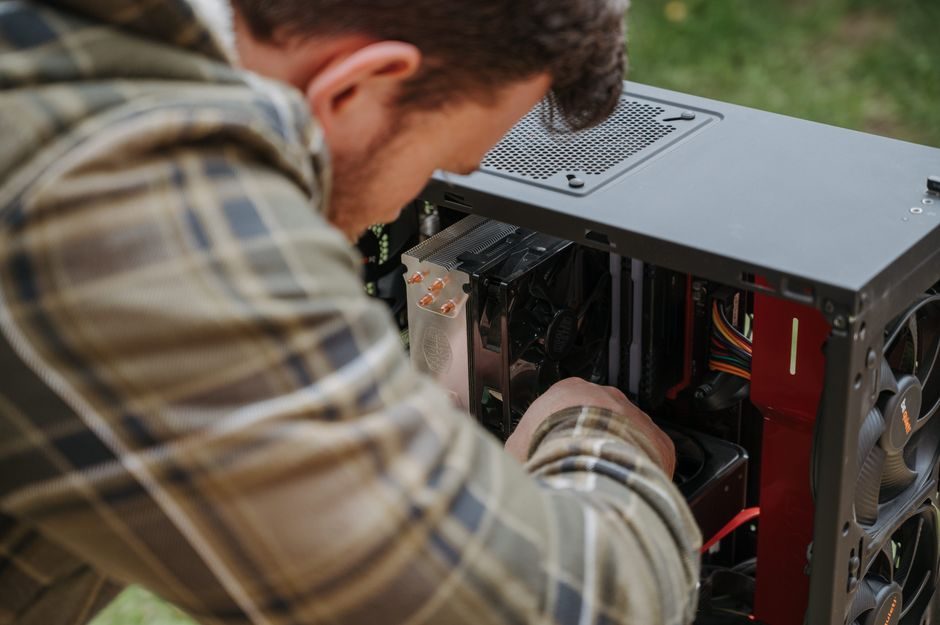
Planning for compatibility and longevity
Choose devices with widely supported standards and upgrade paths to maximize lifespan. Favor hardware with open ecosystems and documented APIs that enable software updates and security patches. Avoid gear that locks users into proprietary ecosystems with limited third-party support.
Evaluate the potential total cost of ownership, including expected maintenance, spare parts, and software licenses. Favor modular designs that allow component swaps rather than entire devices.
Create a simple upgrade calendar for common devices to plan when to replace or augment parts.
- Prefer open standards
- Check upgrade paths
- Assess TCO
- Use modular designs
- Schedule regular reviews
Buying smarter with future-ready signals
Look for devices with documented warranty terms, secure boot options, and trusted third-party repair support. Check community forums for reports on long-term reliability rather than flashy specs. Prioritize vendor-backed security updates and clear end-of-life timelines.
Ask sellers about planned retirements or firmware cutoffs that might affect safety or usability. Reserve budget for essential replacements to avoid rushed purchases.
Test devices under plausible future workloads to reveal latent weaknesses and plan contingencies.
- Security updates visibility
- Reliable repair support
- Clear end-of-life
- Planned retirements
- Future workloads testing
Frequently asked questions
How can I verify a seller’s trustworthiness?Trust comes from transparent history, verifiable item condition, and accessible return policies. Check seller ratings, compare descriptions with real photos, and request a short video showing the device in use. Demand receipts or proof of prior ownership when possible. Look for a warranty or return window that aligns with your risk tolerance. If a seller avoids questions about history, proceed with caution and consider alternative vendors.
What should I test first on a used device?Start with power-on behavior and screen condition, then test essential functions like audio, inputs, and connectivity. Run a quick diagnostics check for battery health and storage. Validate that wireless interfaces, cameras, and sensors respond as expected. Document any faults before purchase and verify whether those faults affect core usability or future repair costs.
Is there a risk with data on second-hand devices?Yes. Perform a full factory reset where possible and ensure accounts are removed. Look for devices with encryption options enabled and verify there is no enterprise management left behind. If possible, request a data sanitization certificate or proof of erasure from the seller.
How do warranties apply to used gear?Warranties on used gear vary; some sellers offer limited time protection or only for specific components. Read the terms carefully to know what is covered and what requires proof of fault. Expect conditions around wear and tear and normal use. If a warranty is vague or short, weigh that against potential repair costs outside warranty.
Conclusion
In practice, buying used tech in Austria or anywhere benefits from a disciplined process: inspect, verify, and document every item, and lean on warranties where possible. The steps outlined here help you assess value without exposing yourself to avoidable risk. Treat each purchase as part of a broader plan for reliable, upgradeable gear.
Takeaways include building a clear history for each device, planning future upgrades, and maintaining transparent seller interactions to sustain trust in the market. The next move is to apply the checklist to your next purchase and set a realistic budget for maintenance and replacements.

Add Technology News as a preferred source on Google


